[CyberDefenders] WorkFromHome
Scenario
Zero Divine-Unit’s Security Operations Center detected a sudden spike of outbound remote-access traffic and privileged log-ons originating from a single Windows 10 workstation in the development network. The timing matched a peculiar internal chat in which a junior developer repeatedly asked a senior colleague for elevated credentials, prompting the SOC to quarantine the host and capture a full forensic image for review.
As part of Zero Divine-Unit’s DFIR team, you now possess that image, the complete senior-junior chat transcript, and concise IT-meeting notes collected during the response. Your mission is to reconstruct the sequence of events, determine any data or credential exposure, and distill actionable remediation and hardening recommendations for leadership.
Initial Access
Q1 - Download timestamp
The threat actor tricked a junior into installing remote desktop software. What is the start download timestamp of this software? (in UTC)
After examining the provided context, the user donald.t is the intial compromised user which was tricked into installing the software. Looking at the users Desktop shortcuts, Edge appears to be the browser that is used. The History database located at
Artifacts\C\Users\donald.t\AppData\Local\Microsoft\Edge\User Datacontains the timestamp of the download. The History file is an SQLite database and once opened using DB Browser for SQLite, the downloads table contains the timestamp. The start_time timestamp is stored in a Chromium timestamp format which represents microseconds passed since Jan 1, 1601 UTC. The Remote Desktop software installed was AnyDesk and was downloaded at 2025-06-21 09:02 UTC

Command and Control
Q2 - Profile name
By tracing the incoming session requests in the remote access tool, what is the profile name of the threat actor on the remote access tool?
AnyDesk creates trace files for every connection that occurs on a system. These files are important for troubleshooting and in this case are important for the investigation. The AnyDesk trace files can be found in
Artifacts\C\Users\donald.t\AppData\Roaming\AnyDesk. The ad.trace file contains the full logs of the session and the incoming session profile name isZeroCTO

Discovery
Q3 - Internal URL
The attacker appears to have discovered an internal website via browser bookmarks. What is the URL of this internal site?
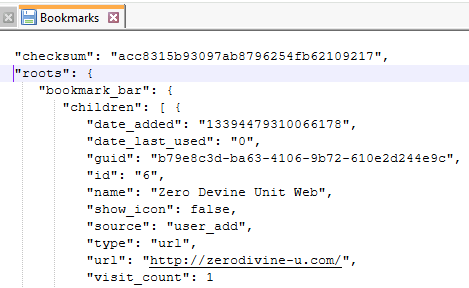
Returning to the user data stored by Edge, there is a Bookmarks file which is in a JSON format. Examining the contents, one particular site stands out. The internal site the attacker discovered is http://zerodivine-u.com
Q4 - Internal site access
After the threat actor obtained credentials from a senior developer via social engineering, what timestamp marks their access to the internal website?
Continuing the examination of the History database, the urls table contains a list of all visited sites. The last_visit_time of the internal site was 2025-06-21 09:10.
Q5 - PDF file
The threat actor downloaded multiple files from the internal website, including a PDF. What is the size of that PDF file? (in KiB, integer value only)
The download history is also located in the History database for Edge. A number of files were downloaded with the one of interest being
C:\Users\donald.t\Downloads\Annual_Business_Plan_2025.pdfwhich was 678650 bytes or 622 KiB.

Exfiltration
Q6 - File transfer
When did the threat actor begin transferring the downloaded files back to their system via the remote access tool?
The AnyDesk log file file_transfer_trace.txt contain the timestamp 2025-06-21 09:12 which is when the file transfer began.

Credential Access
Q7 - Brute-force IP
It seems like the attacker identified a pattern in the internal website’s password and started applying it to the senior developer’s account. What IP address was used to brute-force that account?
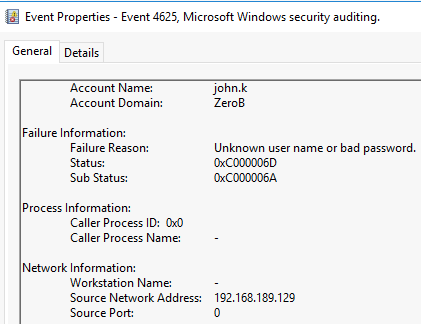
The attacker attempted to brute-force the account which would lead to a number of failed login attempts. The Security events located at
Artifacts\C\Windows\System32\winevt\logsfiltered for event ID 4625 show multiple attempts from the IP 192.168.189.129
Q8 - RDP Logon
It appears that the attacker obtained the correct password of a senior developer and logged in to the workstation via RDP. When did this logon occur?
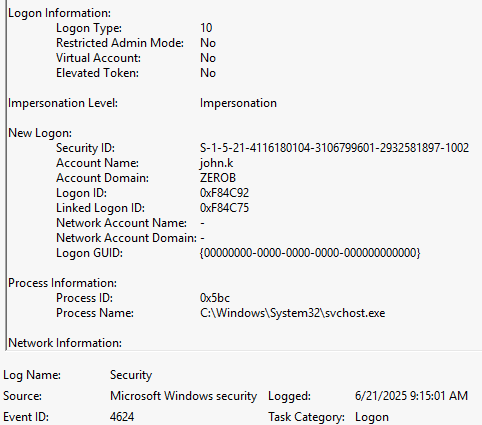
After a period of brute-force attempts, the attacker managed to successfully login as the user john.k. The Security events filtered for event ID 4624 searched reveal that the RemoteInteractive session (Logon Type 10) was successful at 6/21/2025 9:15 AM
Q9 - Special privilege
It seems like the threat actor leveraged a well-known LOLBin for special privilege discovery. By correlating its execution timestamp with other privilege-related events, what is this privilege?
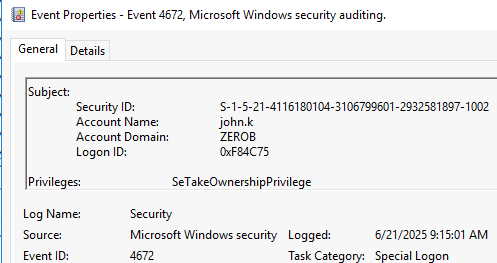
Looking further into the security log using event ID 4672 (Special privileges assigned to new logon), there is a privilege which is assigned to the user john.k. The privilege is SeTakeOwnershipPrivilege which allows the user to take ownership of any securable object in the system, including Active Directory objects, files and folders, printers, registry keys, processes, and threads.
Q10 - LOLBins
What two LOLBins were utilized to take advantage of the privilege identified in the previous question?
To determine which LOLBins were utilized, the prefetch files can be used to see what applications were run on the system. Using PECmd to parse the prefetch files into a CSV, they can be quickly analyzed using Timeline Explorer. Since the special privilege assigned involves changing ownership and permissions, two LOLBins stand out - ICACLS.exe (Displays or modifies discretionary access control lists (DACLs) on specified files and applies stored DACLs to files in specified directories.) and TAKEOWN.exe (Enables an administrator to recover access to a file that previously was denied, by making the administrator the owner of the file. This command is typically used on batch files).


Q11 - First target
Which executable was the first target of these two LOLBins, and who is the original user with full control of that file?
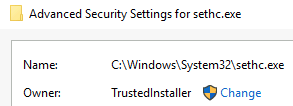
After determining which LOLBins were used, the next step is finding how these were abused. Using the USN Journal to look for Security Changes to files, the sethc.exe is found to have been modified within the timeline of the attack at 9:18.
This is the Windows executable for sticky keys and is often abused by attackers to gain elevated access to a system. As a system executable, it is located in C:\Windows\System32 and is a protected executable normally owned by NT SERVICE\TrustedInstaller.

Q12 - New file name
The threat actor renamed a previously identified file in order to replace it. What is the new name of this file, and what is the full path of the file that replaced it?
With the information that sethc.exe was the targeted executable, this leads the investigation to see what executable was used to replace it. Using the USN Journal and searching for Rename Update Reasons, the original sethc.exe is found to have been renamed to sethc.exe.bak.
Moving to the MFT file and searching for the original sethc.exe, the file that replaced it is found by searching for files of the same size in the same location.


Q13 - High privilege
In order to gain higher privileges, the threat actor had to terminate their initial session to start a new one with elevated privileges. What timestamp marks when they gained a high-privilege shell on this workstation?
The attacker now has the ability to launch cmd.exe with System level privileges. To find when the elevation occured, the prefetch files should be checked for execution of sethc.exe. The execution count shows two, so the initial gain of privileges is the Previous Run at 9:22.

Defense Evasion
Q14 - Whitelisted folder
The threat actor created a folder and executed a command to whitelist it in the primary security tool on the machine. What is the full path of this folder?
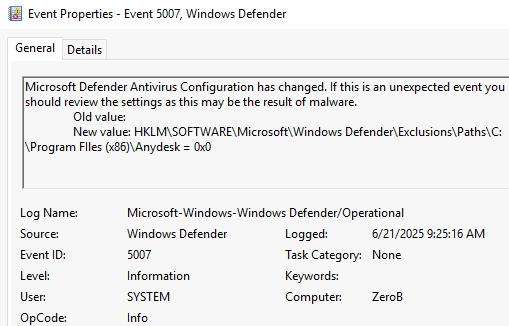
Using the newly elevated privileges, the attacker has whitelisted a folder to ensure execution of malicious binaries on the system. The whitelisted folder is found using the Event logs, specifically the Microsoft Windows Defender\Operational log. The event ID 5007 is seen at 9:25 with the folder C:\Program FIles (x86)\Anydesk being whitelisted.
Persistence
Q15 - Implanted file
It seems the threat actor created and whitelisted a directory, then downloaded and persisted an implant there. What is the implant’s filename and what description did they assign to the persistence entry?
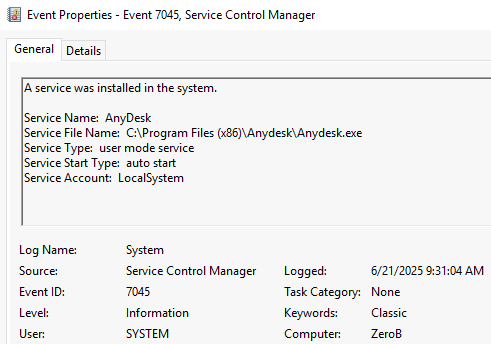
After whitelisting the directory, the attacker downloaded a file to maintain access to the system. Looking at the System event log for event ID 7045, AnyDesk.exe is found to have been downloaded and dropped into the newly whitelisted directory.
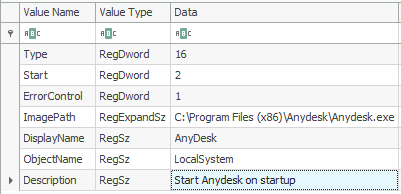
With the information located on what service was installed, the system registry hive should be loaded to find the details of the installed service. Information on installed services is located in ControlSet -> Services with AnyDesk being the service of interest. The description of the service is Start Anydesk on startup.